Quebec Invoice Guide: GST, QST, Mandatory Fields
Professional invoices in Quebec: GST and QST registration, mandatory fields, retention rules, and how to automate it all inside TowerZ.
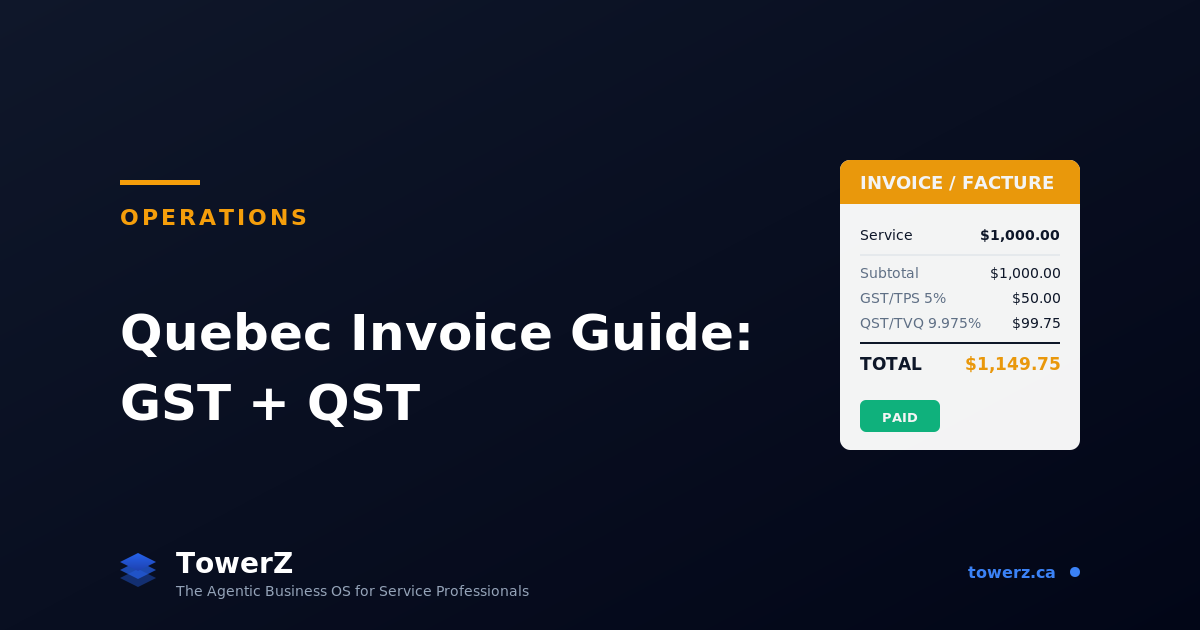
Quebec Invoice Guide for Service Businesses: GST, QST, and What You Must Include in 2026
If you run a service business in Quebec, the invoice is not paperwork. It is the moment your work becomes revenue.
It is also the moment your business meets the tax system. GST (federal, 5%) and QST (provincial, 9.975%), together about 14.975%, must be calculated, displayed, collected, and remitted properly. Missing a field or mis-displaying the tax can mean an audit headache, a refused expense claim from your client, or a bookkeeping snarl that takes weekends to untangle.
This guide covers what you must include on a Quebec invoice in 2026, how to handle GST/QST, when to register, and how to stop maintaining all of this manually.
When You Must Register for GST and QST
The first question every service business in Quebec asks. The answer depends on revenue.
Below $30,000 in worldwide taxable sales over 4 consecutive quarters: You are a "small supplier." You are not required to register or charge GST/QST. You can choose to register voluntarily, useful if your clients are businesses who reclaim the taxes, because registering lets you reclaim input taxes too.
Above $30,000 in worldwide taxable sales over 4 consecutive quarters: You must register, charge, collect, and remit GST and QST on all taxable services.
Specific QST trigger for non-residents and remote sellers: If your local sales in Quebec pass CAD 3,000, you may have to register and comply with QST rules even if you are based outside Quebec.
Once you cross the threshold, registration must happen within 30 days of the sale that triggers it. You receive two separate registration numbers:
- GST/HST number: Issued by the CRA, in format
123456789 RT0001. - QST number: Issued by Revenu Québec, in format
1234567890 TQ0001.
Both must appear on every taxable invoice you issue.
What a Compliant Quebec Invoice Must Include
Revenu Québec is specific about invoice content. The mandatory fields depend on the invoice amount, but for any invoice above $30, you need all of the following:
- Your business legal name (and trade name if different).
- Your address and contact info.
- Your GST registration number (the
RT0001format). - Your QST registration number (the
TQ0001format). - Invoice date.
- Unique invoice identifier (sequential number).
- The client's name (legal or trade name).
- A clear description of the service or product, with quantities and unit prices.
- The subtotal before taxes.
- GST shown separately, with the rate (5%) and amount in CAD.
- QST shown separately, with the rate (9.975%) and amount in CAD.
- The total payable in CAD.
For invoices between $30 and $150, you can simplify some fields, but listing the full set is safer and clearer for the client.
How to Display GST and QST Correctly
Both taxes are calculated on the same subtotal, not QST on top of GST. The cascading interpretation was discontinued years ago and remains a common mistake.
Here is the correct display for a $1,000 service:
| Line | Amount (CAD) |
|---|---|
| Subtotal | $1,000.00 |
| GST (5%) | $50.00 |
| QST (9.975%) | $99.75 |
| Total | $1,149.75 |
Both rows must appear. Both rates must be visible. Both registration numbers must be on the invoice.
Some service businesses display only "Taxes: $149.75." That is non-compliant. The client cannot reclaim input tax credits without seeing GST and QST separately, with both registration numbers visible.
Special Cases Service Businesses Hit Often
A few situations come up regularly and trip people up.
Zero-rated and exempt services. Some services are GST-exempt (most healthcare, certain childcare). Others are zero-rated. The distinction matters for what you can reclaim as input tax. When in doubt, verify the specific service category with Revenu Québec or an accountant.
Mixed services (taxable + exempt) on one invoice. Split the invoice into clearly separated sections, taxable items together with their GST/QST, exempt items together with a note explaining the exemption.
Out-of-province clients. For business clients in other provinces, the federal GST/HST rules of the recipient's province may apply. A Quebec service provider invoicing an Ontario business client typically charges HST at 13% (Ontario) rather than GST+QST. Consult an accountant before assuming.
Cross-border services (US/international clients). Most international services are zero-rated for GST/QST. The invoice still needs to show $0 for taxes (not the absence of the lines), with a note explaining the zero-rating.
Deposits and instalments. GST/QST is generally owed when the deposit is collected, not at final delivery. Track this carefully, it is one of the most common sources of small but recurring tax errors.
How to Number Invoices (the Boring Detail That Saves Audits)
Every invoice must have a unique sequential identifier. Three rules:
- No gaps. If you issue invoice 0042 and then 0044, you must be able to explain (and probably show) 0043. Auditors check for gaps.
- Cannot reset every year by default. A common mistake is restarting numbering each January. You can do it, but the numbering scheme has to make missing invoices obvious (e.g.,
2026-0001format). - Cannot reuse numbers. A voided invoice keeps its number. You issue a credit note, not a renumbered invoice.
A clean numbering scheme is 2026-0001, 2026-0002, etc. Simple, audit-friendly, sortable.
How Long to Keep Invoices
The CRA generally requires you to retain all business records, including invoices, both issued and received, for six years from the end of the tax year to which they relate.
Storage rules:
- Digital storage is allowed if it is readable and accessible.
- Originals of paper invoices should be preserved if they exist, though digital scans are accepted.
- A backup is required: preferably off-site or cloud-based.
Two invoices from 2026 must therefore still be retrievable, on demand, in 2032. The right system is one where this happens automatically, not one where you maintain a personal folder system for six years.
How to Stop Doing This Manually (the TowerZ Approach)
Almost everything in this guide can be handled by software that knows it is operating in Quebec. The benefit is not just convenience, it is compliance and audit safety.
TowerZ's invoicing is built specifically for Quebec service businesses:
- Automatic tax calculation with GST 5% and QST 9.975% applied correctly to the subtotal, displayed on separate lines.
- Your GST and QST registration numbers stored once and embedded on every invoice automatically.
- Sequential numbering that cannot create gaps or reused numbers, with formats like
2026-0042. - Per-service tax configuration: mark a service as taxable, exempt, or zero-rated, and the invoice generates correctly without manual checking.
- Out-of-province logic that adjusts taxes when invoicing clients outside Quebec.
- Six-year cloud retention with audit-friendly export, every invoice retrievable on demand, including issued and voided.
- The Revenue AI agent monitors unpaid invoices and prepares a polite, escalating reminder sequence for approval; changes to payment terms or arrangements remain human decisions.
Because invoices are connected to the Finances dashboard, the same data flows into your live profit and loss statement, cash flow chart, and per-category budget, meaning you do not have to maintain two systems (one for invoicing, one for reporting).
The invoicing module is part of TowerZ's Operations suite, alongside Bookings, Payments, Clients, and the Business Dashboard.
Ready to stop manually checking tax math?
Try TowerZ for free and send your first Quebec-compliant invoice in under a minute.
Frequently Asked Questions about Quebec Invoicing
Do I need to register for GST and QST before I hit $30,000? You can voluntarily register at any time. If your clients are businesses that reclaim input taxes, voluntary registration usually helps. If your clients are individual consumers, registering before required usually doesn't.
What if I forget to charge tax on an invoice? The tax is still owed. You either go back to the client to add it (legally awkward but allowed) or absorb the cost yourself. The latter happens more than people admit, which is why automation matters.
Can I include both invoice and quote in the same document? You can, and TowerZ generates both formats, but they are legally distinct. A quote is an offer. An invoice is a demand for payment with tax implications. Don't confuse them in the same number sequence.
Do I have to send paper invoices? No. Electronic invoices (PDF or other formats) are accepted as long as they contain all mandatory fields and are retrievable for six years.
What about clients abroad? Most exported services to non-residents are zero-rated for GST/QST. The invoice still must display the zero-rating clearly. Don't omit the tax lines entirely, show $0 with a note.
TowerZ is built for service businesses that want to grow with intention. The Invoicing, Payments, and Finances modules, combined with strategy and AI agents, give Quebec service entrepreneurs a complete, compliant operations system, with no commission on transactions on paid plans.

About Orléando Dassi
Chief Executive Officer & Co-Founder
Orléando leads product vision, business strategy, and the long-term direction behind Automathing Group Inc. and TowerZ. He combines 12+ years in IT with a bachelor's degree in software development, business launch (ASP) training, and an MBA in progress at Université de Sherbrooke.
Related articles
Business Diagnostic: 12 Questions to See What to Fix First
A practical business diagnostic with a scorecard, signal reading, and a worked example so you know what to fix first.
Why Your Marketing Problem Is Actually an Operations Problem
A simple framework to separate a real marketing problem from an operations leak caused by follow-up, no-shows, retention, capacity, or pricing.
How to Do a Competitor Analysis (Step-by-Step)
A practical 7-step competitor analysis method. Generate yours in 60 seconds with TowerZ.